NSW Selective Trial Test 2027: The Ultimate Student Survival Guide — Selective online practice for the NSW exam
By GoTestPrep
NSW Selective Test prep · Exam Strategy & Platform Hacks · 5 April 2026

By the GoTestPrep Educational Team · Updated: April 2026
Our guides are created by educators and test-prep specialists to help students and families navigate the NSW High School Placement process. Please note: GoTestPrep is an independent educational platform and is not affiliated with the NSW Department of Education or Janison.
Hello Year 5 and Year 6 legends!
If you are reading this, it means the calendar has officially hit April 2027. The official NSW Selective High School Placement Test is just weeks away (happening on the 1st and 2nd of May 2027). You've probably spent months doing homework, learning new maths formulas, and writing essays. But right now, you are entering the most important phase of your preparation: the selective trial test phase.
Sitting a trial test is completely different from doing a regular worksheet or a bit of weekend homework. Because the 2027 exam is 100% digital (taken on a computer), you aren't just tested on how smart you are; you are tested on your Screen Stamina, your timing, and your digital strategy.
In this mega-guide written specifically for you (the student!), we are going to break down exactly what a selective trial test is, how to beat the digital timer, and the "cheat codes" you need to conquer all four sections of the exam.
Grab your rough-working paper, sit up straight, and let's dive in.
1. Practice vs. Trial: What's the Difference?
You might hear your teachers or parents use the words "practice" and "trial" like they mean the same thing. They don't! Understanding the difference is the first step to leveling up your score.
- Selective practice: This is your training ground. It's when you take your time learning how to solve a tricky fractions question, or figuring out what a new vocabulary word means. You can stop, ask for help, and take breaks.
- Selective trial test: This is the Grand Final dress rehearsal. It is a full, uninterrupted, timed simulation of the real exam. No parents, no dictionary, no calculator, and no pausing the clock.
Why you need to do trial tests right now
Imagine trying to run a marathon without ever practicing running more than one kilometre at a time. Your muscles would give up! Your brain works the exact same way.
The 2027 Selective Test lasts for over two hours. Staring at a computer screen for that long, while doing extreme mental gymnastics, causes Visual Fatigue (tired eyes) and Cognitive Overload (a tired brain). Taking a full, digital selective trial test on the weekends builds your "Screen Stamina" so that on May 1st, a two-hour computer test feels totally normal.
Browse timed selective mocks when you are ready to rehearse on screen.
2. Beating the 25% Rule (Why Every Subject Matters)
A few years ago, students who were incredibly good at Maths could easily get into top schools like James Ruse or Baulkham Hills, even if their writing wasn't great.
That rule is gone.
In 2027, the NSW Department of Education uses a perfectly equal grading system.
- Reading: 25%
- Mathematical Reasoning: 25%
- Thinking Skills: 25%
- Writing: 25%
This means you cannot hide from your weakest subject! If you are a maths genius but you type your essay with one finger, your overall score will drop. A selective trial test is your best tool for finding out which of these four "boss battles" is your weakest, so you can fix it before the real test.
3. The 4 "Boss Battles" & How to Beat Them
When you sit down to do a selective trial test on GoTestPrep, you will face four distinct sections. Here is the ultimate strategy guide for each one.
Battle 1: Mathematical Reasoning (40 Minutes, 35 Questions)
The rule: No calculators allowed!
The Maths section in 2027 isn't about doing massive multiplication equations in your head. It is about solving real-world puzzles.
- The trap: Trying to juggle numbers in your brain. The computer screen is designed to hold the question, but your brain isn't designed to hold three different numbers while doing division.
- The cheat code: Use your rough paper! During your trial tests, force yourself to pick up your pencil and draw the problem. If the question is about a farmer building a fence, draw a square. If it's about a swimming pool filling up, draw a box and write the numbers inside it. Externalising the math onto paper frees up your brain to solve the logic.
Mathematical Reasoning mock tests match timed, on-screen conditions.
Battle 2: Thinking Skills (40 Minutes, 40 Questions)
The rule: 60 seconds per question.
Thinking Skills is the hardest section for most students because it tests raw logic. You have exactly 40 minutes to do 40 questions. That means one minute per question.
- The trap: Getting stubborn. You might stare at a 3D shape-folding puzzle for 4 minutes because you really want to solve it. But by doing that, you just lost the time needed to answer three easy questions at the end of the test!
- The cheat code: The 30-second rule. If you read a question and you have no idea what it is asking after 30 seconds, click the digital "Flag" button and skip it. Move on! Come back to it at the very end. The Selective Test is a point-scavenger hunt. Go collect all the easy points first.
Thinking Skills practice tests help you build that rhythm.
Battle 3: Reading (40 Minutes, 30 Questions)
The rule: Hunt for the evidence.
You will read classic stories from the 1800s, modern news articles, and poetry. You will also face "Cloze" passages, where you have to use a dropdown menu to insert missing words into a paragraph.
- The trap: Reading the text first, getting bored, forgetting what you read, and then reading the questions.
- The cheat code: Read the first three questions BEFORE you read the text. This acts like a search filter for your brain. If you know Question 1 is looking for "Why the boy felt angry," your eyes will automatically lock onto the angry words when you scroll through the text.
Reading mock exams help you practise on screen.
Battle 4: Writing (30 Minutes, 1 Prompt)
The rule: Type fast, structure perfectly.
You will be given a surprise topic. It could be a persuasive essay, a story, or a news article. You have 30 minutes to plan, type, and edit your work on the computer. There is no spell-check!
- The trap: Starting to type immediately without a plan, getting stuck halfway through, and having a messy, unfinished story when the timer runs out.
- The cheat code: The 5-20-5 strategy.
- First 5 mins: Do not touch the keyboard. Use your rough paper to plan your structure (like the TEEL structure for essays).
- Next 20 mins: Type as fast as you can. Aim for 30–35 words per minute (WPM). Do not stop to fix every tiny spelling mistake yet. Just get your ideas on the screen.
- Last 5 mins: Stop writing new sentences. Read your whole piece from top to bottom and fix your spelling, punctuation, and capital letters.
Writing mock tests let you rehearse typing under time pressure.
4. Surviving the Digital Interface
Taking a computer-based test (CBT) requires serious tech skills. When you practice on a high-level platform like GoTestPrep, you learn how to use the specific digital tools that will be on your screen in May.
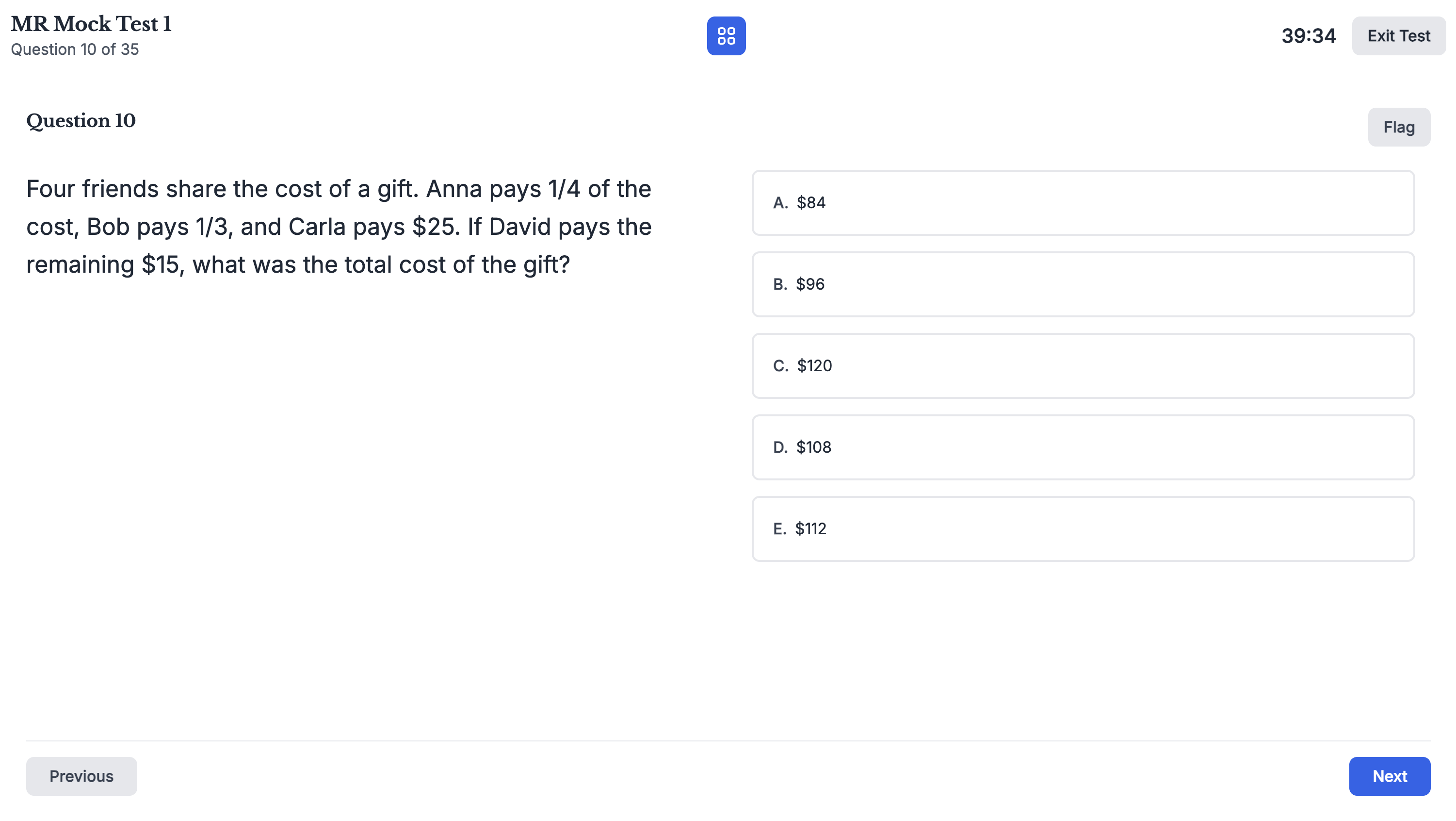
Mathematical Reasoning mock on GoTestPrep: section timer and controls you can practise before test day.
Here is how to master the digital interface during your selective trial test:
- The digital timer: In the corner of your screen, the clock will be counting down. Do not look at it every ten seconds! Check it at the halfway mark (20 minutes) to make sure you are roughly halfway through the questions (Question 18–20).
- The multiple-choice eliminator: When you look at A, B, C, and D, you usually know that two of them are completely wrong. Practice visually ignoring those two. If you have to guess, guessing between two options gives you a 50% chance of winning a mark!
- The Review Screen (the Red Zone!): When there are 5 minutes left on the clock, you enter the "Red Zone". Your main job is to click on the Review Screen grid. Look for any white, empty boxes. There is no penalty for guessing in the Selective Test. If you leave a bubble blank, you get a 0%. If you guess 'C', you have a 25% chance of getting a mark. Never leave a blank bubble!
5. Taming the Test-Day Nerves
Let's be honest: sitting a selective trial test can feel stressful. Seeing a low score on the screen can make you feel panicked. But remember this: The trial test is designed to be hard! It is better to make a mistake now, in April, than to make it in May. Every wrong answer is just a lesson pointing you toward the right answer.
If your heart starts beating fast during a difficult Thinking Skills logic puzzle, use the Box Breathing technique:
- Breathe in for 4 seconds.
- Hold your breath for 4 seconds.
- Breathe out for 4 seconds.
- Hold for 4 seconds.
This physically tells your brain to calm down and turns your logical thinking back on. You are in control of the computer; the computer is not in control of you.
6. Why GoTestPrep is Your Ultimate Training Ground
Note: Show this section to your parents so they can set you up!
If you want to train for the 2027 digital test properly, you need the right simulator. Doing paper worksheets right now is like training for a swimming race by running on a treadmill.
At GoTestPrep, we have built the ultimate selective trial test simulator. Our screen looks, acts, and feels like the real Janison-delivered digital test you will face in May.
What you get inside the platform:
- 80 full-length mock exams: That's 20 for Maths, 20 for Thinking Skills, 20 for Reading, and 20 for Writing. You will never run out of practice!
- Over 2,500+ questions: Designed for the 2027 equal-weighting format.
- Instant explanations: When you get a hard question wrong, we don't just give you an 'X'. We show you exactly how to solve it step-by-step so you never make that mistake again.
- The analytics dashboard: Like a video game stats screen, we show you exactly what your super-powers are (e.g., "You are amazing at Spatial Reasoning!") and where you need to level up (e.g., "You need to work on Vocabulary!").
7. Student FAQ: Quick Answers to Big Questions
Can I use a calculator or my own ruler?
No. You are not allowed to bring smartwatches, calculators, or rulers. You will be given a computer, a mouse, a keyboard, and blank rough-working paper. That's it! Confirm details on the Department's test day checklist.
What if I don't know a huge vocabulary word in the Reading test?
Don't panic. Read the sentence before the hard word, and the sentence after it. Usually, the author leaves "context clues" around the big word to help you guess what it means.
I type really slowly. Will I fail the Writing section?
No, but you need to be smart! If you type slowly, you won't be able to write a massive 500-word essay. Instead, aim for a shorter, 250-word piece, but make sure your vocabulary is amazing and your punctuation is perfect. A short, excellent piece will beat a long, messy one.
What happens if my computer freezes on test day?
Put your hand up immediately. The test supervisors are trained to help you. The system automatically saves your answers, so you won't lose your work!
Your Final Mission
You have a few weeks left until the big day. Every time you sit down to do a selective trial test, treat it like the real thing. Put on your school uniform to get in the zone, tell your family not to disturb you, and battle the clock.
You have done the hard work. Now it is time to prove it on the screen.
Ready to start your training? Grab your parents, explore our free trial (no payment details required), and experience the 2027 digital test simulator today.
Start your free trial on GoTestPrep
Resources for You and Your Parents
- NSW Department of Education — selective high school placement test (official overview for students and families)
- NSW Department of Education — what to expect on test day (checklist, rules, and breaks)